If you have implemented AVEVA Historian, there is a good chance that you are maintaining legacy InTouch historical (LGH) files —either from before a migration or as a fallback during historian outages.
That data is often overlooked, but it’s still valuable. Whether you’re troubleshooting a past event, validating a process change, or trying to build a longer-term trend, gaps in your historian can slow you down.
To solve that problem without adding unnecessary complexity, Software Toolbox’s LGH File Inspector for AVEVA InTouch converts existing LGH files into AVEVA Historian FastLoad CSV format, allowing you to bulk-load the data into your historian using AVEVA Historian’s FastLoad import process.
How it Works
LGH File Inspector offers flexible configuration options, allowing you to adjust FastLoad header settings and other parameters to suit your requirements via the LGHFileInspector.exe.config file within your Install Directory.
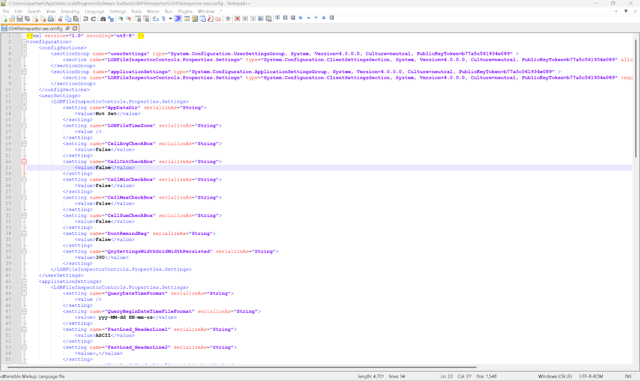
When “Anyone who uses this computer (all users)” is chosen on installation, your Install Directory will be C:\Program Files (x86)\Software Toolbox\LGHFileInspector\
When "Only for me (Windows User)” is chosen on installation, it will be C:\Users\username\AppData\Local\Programs\Software Toolbox\LGHFileInspector\ where username is replaced by the installed user account.
FastLoad Configuration Options (LGH File Inspector V4)
The configuration options below apply to LGH File Inspector V4. Default values work for most environments. Refer to the product help file for the full parameter reference.
|
Field |
Default Value |
Details |
|
FastLoad_HeaderLine1
|
ASCII |
1st line of FastLoad file header. Defines the file encoding format. |
|
FastLoad_HeaderLine2 |
, |
2nd line of FastLoad file header. Defines the field delimiter character used in the FastLoad file (comma by default). |
|
FastLoad_HeaderLine3 |
Default,1,Server Local,1,1 |
3rd line of FastLoad file header. LGH File Inspector converts historical timestamp data in the .LGH files from UTC to Local Time. Therefore, the Time Format field of the 3rd line of the header should always be set to 1 and the Time Zone field also in the 3rd line of the header should always be set to Server Local. LGH File Inspector does not have access to the wwTagKey for InTouch tag names, therefore the Missing Block Behavior field of the 3rd line of the header should never be set to 11. |
|
FastLoad_OperationType |
3 |
2nd field value of a FastLoad data row |
|
FastLoad_ValueInRawEU |
0 |
5th field value of a FastLoad data row. LGH File Inspector returns data in engineering units as logged in the .lgh file. Therefore the 5th field value of the FastLoad data row should always be set to 0 for EU |
|
FastLoad_OPCQuality |
192 |
7th field value of a FastLoad data row. OPC quality code assigned to each imported record. 192 = Good (Non-specific) per the OPC DA specification. Modify only if your historian requires a specific quality flag. |
|
FastLoad_DateFormat |
yyyy/MM/dd |
Date Format |
|
FastLoad_TimeFormat |
HH:mm:ss.fff |
Time Format |
Ready to start reclaiming your historical LGH data?
View the LGH File Inspector page for details and pricing.