By now, you’ve probably heard that TOP Server V7 has officially landed. Maybe you’ve seen the announcements or caught a quick overview along the way. But if you find yourself wondering, “Okay, but what does this release actually change for me?” you’re in the right place.
While V7 continues to reinforce the stability and reliability TOP Server is known for, this release also introduces several important enhancements aimed at strengthening enterprise deployments, simplifying user management, and modernizing system compatibility. Whether you’re operating on the latest infrastructure or maintaining long-standing environments, V7 delivers meaningful improvements that make deployment more flexible, secure, and future-ready.
Let’s take a closer look at what’s new.
Active Directory Integration for User Management
If you’ve ever managed user permissions inside TOP Server, you know it’s an important task, but not always the most exciting one. Traditionally, configuring users would mean maintaining a separate list within TOP Server itself. With V7, that process becomes significantly easier.
Native Active Directory integration now allows TOP Server to connect directly to your existing directory infrastructure. Users and groups already defined in Active Directory can be assigned TOP Server permissions without the need for duplicate configuration.
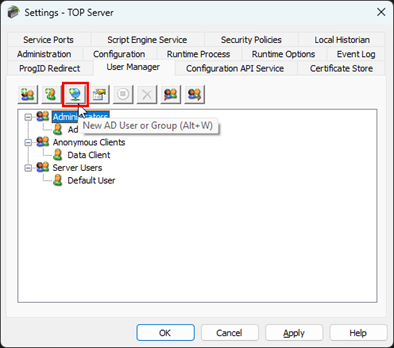 This means simpler onboarding and offboarding, fewer administrative steps, and a more consistent security model across your organization. Your IT team continues using the tools they already know while integrating users into TOP Server’s permissions. For organizations with complex team structures or frequent personnel changes, this translates to real, tangible efficiency gains.
To learn more about this addition, please see our dedicated page: Active Directory Integration for TOP Server Configuration and OPC UA Server User Management.

Windows Server 2025 Support
Staying aligned with current operating systems isn’t just about keeping up with trends, it’s about ensuring your systems remain secure, supported, and performant over time. With TOP Server V7, full support for Windows Server 2025 is now available, allowing your deployment to run on the newest Microsoft server platform with confidence.
Your TOP Server installation can now take advantage of the enhanced performance, strengthened security features, and updated management tools that Windows Server 2025 provides. Whether you're planning new installations or preparing for upcoming infrastructure upgrades, V7 ensures your system remains compatible as organizations transition to newer operating systems.
Other Important Topics
Expanded Allen-Bradley ControlLogix Support – TOP Server V7 extends compatibility with Allen-Bradley ControlLogix controllers through support for firmware versions 36 and 37 (as well as expanded support for V35 data types).
Updated Certificates for Increased Security – Security remains a top priority, and V7 takes a proactive step forward by defaulting all self-signed instance certificates to more secure 2048-bit public keys. This change affects several components including the OPC UA Server Interface, OPC UA Client Driver, Configuration API Service REST Server, IEC 61850 MMS Client, and MQTT Client Driver instance certificates.
If you're upgrading from a previous version and are currently using self-issued instance certificates, you'll need to take action to ensure client and server applications continue to trust TOP Server. We strongly recommend consulting the Migration Guide before upgrading to understand the specific steps required for your environment.
There are many other features and improvements that are included in TOP Server V7 so I would highly suggest taking a look at our full TOP Server V7 release notes here.
Introducing Kepware Edge
Alongside TOP Server V7, we’re also introducing an exciting new product, Kepware Edge.
This tool was designed specifically for Linux environments and container-based deployments. Kepware Edge is now bringing industrial connectivity into modern architectures. Built on a 64-bit platform and optimized for high-volume data handling, it serves as both an OPC UA Server and MQTT Client Publisher, making it a powerful option for edge and cloud-focused environments and applications.
Its container-based design enables faster deployments, easier scalability, and simplified system management making it ideal for organizations that are looking to modernize their automation processes.
For those who plan to deploy multiple Kepware Edge instances, licensing is managed by a centralized license server. Licenses are applied at the licensing server level, and each Kepware Edge instance simply connects to it as needed, removing the hassle of managing licenses separately for each deployment.
Explore Kepware Edge and TOP Server: Trial, Release Notes, and Upcoming Insights
We’ll go much deeper into Kepware Edge in an upcoming blog post, where we’ll look at its full capabilities, real-world use cases, and how it fits into changing industrial automation strategies. In the meantime, you can review the new TOP Server release notes or download the latest TOP Server V7 trial version.