Welcome back to our blog! In our previous post, Protecting Historical Data Integrity Using Store & Forward, we walked through several architectures that leverage Cogent DataHub to securely historize data while minimizing the risk of data loss. Today, we will expand on this concept by putting it into practice.
Why It Matters
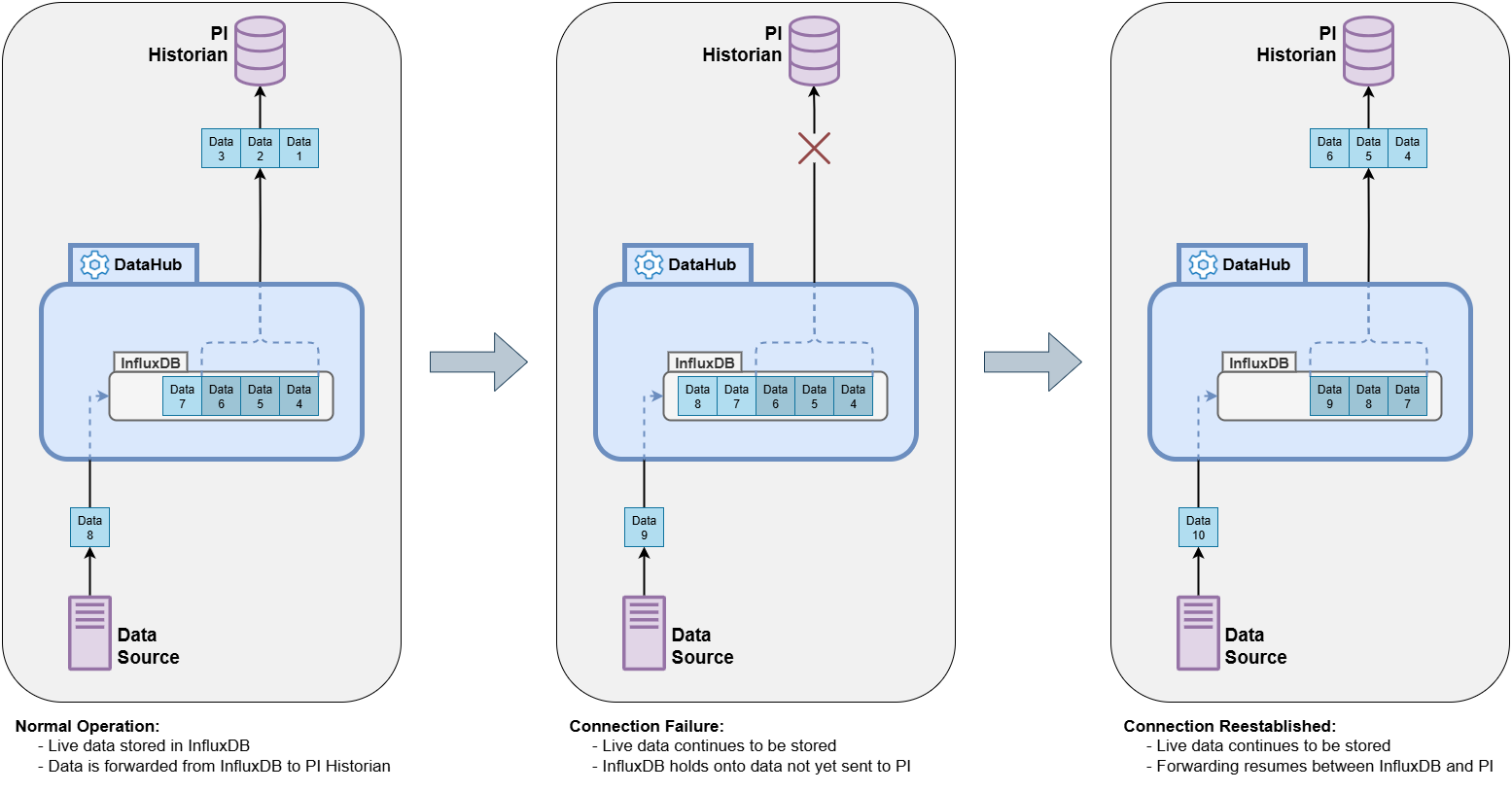
Even a brief connection outage can lead to gaps in historized data, compliance risks, and lost insights. Store and Forward ensures your data is continuously captured and preserved, buffering data during interruptions and forwarding seamlessly once connections recover, so your operations stay resilient and reliable.
How to Add Store and Forward to PI Historian Logging
Cogent DataHub can be used to aggregate data from diverse sources in an OT network and securely tunnel it to resources on an IT network. Its native connectors for a variety of historians makes Cogent DataHub a flexible solution for many users.
This tutorial will walk through the Cogent DataHub configuration to set up a connection to PI Historian with Store and Forward functionality. Cogent DataHub installs with InfluxDB pre-configured for internal use, which we will use to queue up the data being sent to PI. If the PI connection goes down, InfluxDB will buffer the unsent data while still receiving the new values at the back of the queue, allowing the historizing to pick up right where it left off once the connection recovers.
Step 1: Enable InfluxDB
Cogent DataHub installs with the InfluxDB v1 service pre-configured for local use. Under the InfluxDB tab, check the box beside InfluxDB V1 and hit Apply to enable it.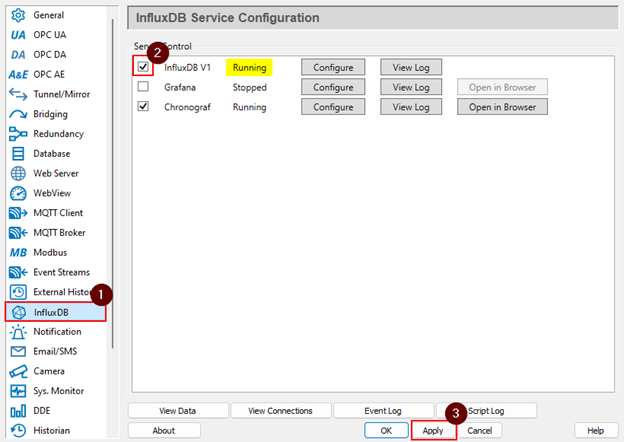
The service will show as Running once it successfully starts up.
Step 2: Get Data into InfluxDB
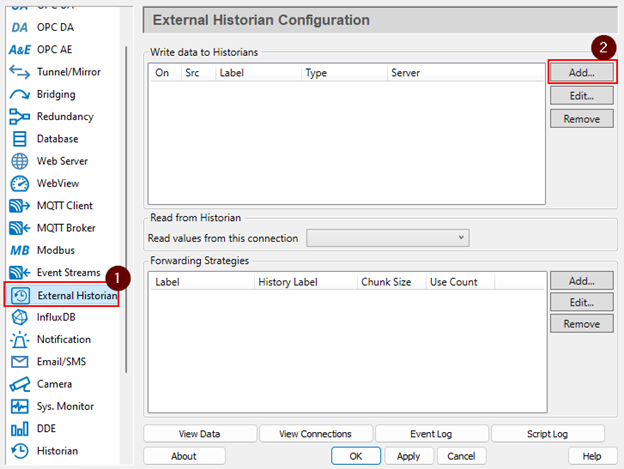
Next, go to the External Historian tab and click the Add button in the Write data to Historians section.
Select the Historian Type InfluxDB V1, and configure the following:
Connection Settings
- Label: PI_Buffer
- InfluxDB URL: http://localhost:8086 (default)
- Database Name: DataHub
Then, select the points that will be logged to PI, and click OK.
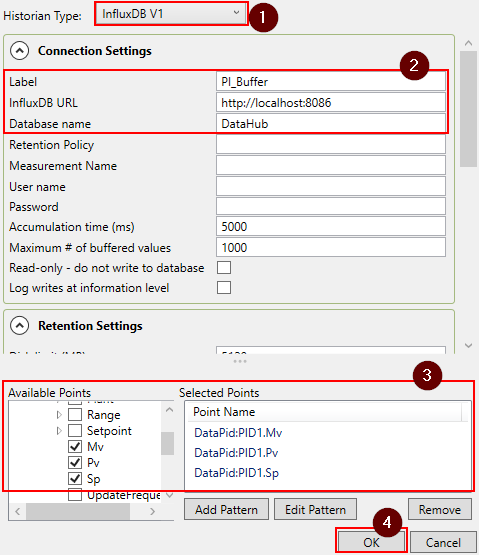
Click Apply in the main Properties window to save the configuration changes and start logging to InfluxDB.
Step 3: Define Forwarding Strategy
Now that we are storing data in InfluxDB, we need to specify how that data will be forwarded to its destination, PI. Back in the main Properties window, next to the Forwarding Strategies section, click Add.
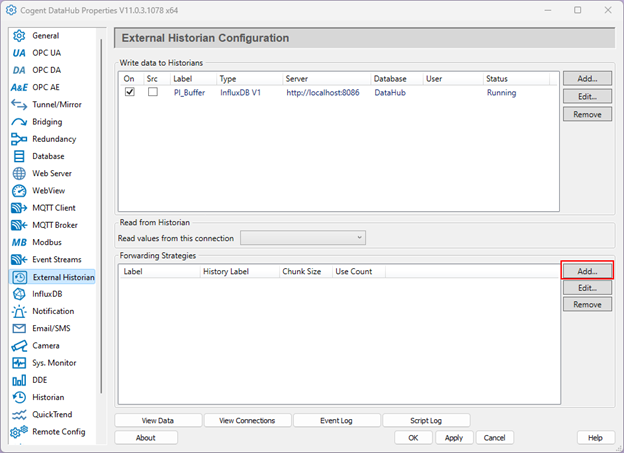
Set the Strategy label to FwdtoPI, and select the PI_Buffer connection as the Local historian label. These labels are user-defined, so ensure they match the correct historian labels in your configuration.
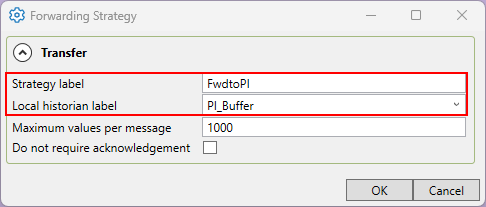
Click OK, then Apply in the main Properties window to save the configuration changes.
Step 4: Configure PI Connection with Forwarding Strategy
The last step is to create our connection to PI and link it to the buffering system we just created. To do this, click the Add button beside the Write data to Historians section again.
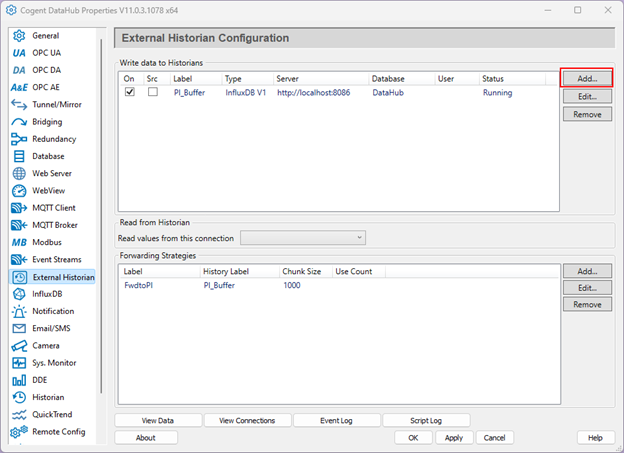
Select the Historian Type AVEVA PI, and configure the following:
Connection Settings
- Label: PI_Historian
- Base server URL: <your PI web API URL>
- Data Server name: <your PI data server>
- User name: <your PI Web API user name>
- Password: <your PI Web API password>
Forwarding
- Enable historical data forwarding: ☑
- Forwarding strategy: FwdtoPI
Note that you will not need to configure the points here— this was already done in the InfluxDB connection.
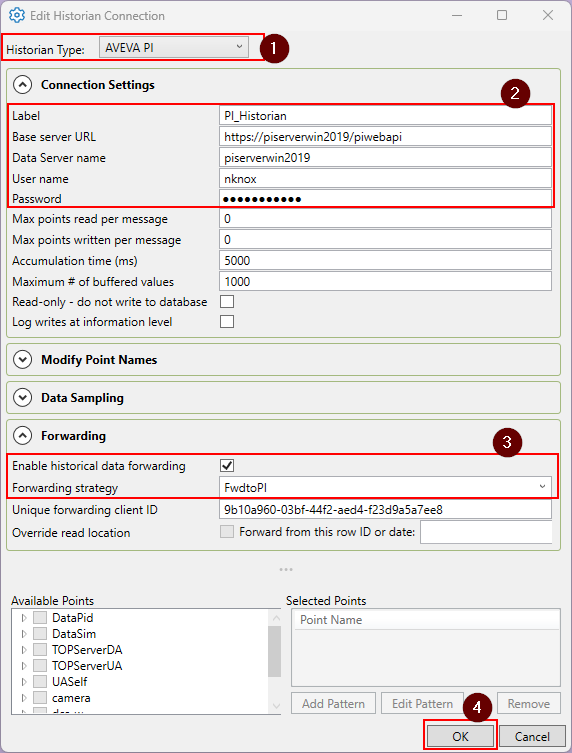
Click OK, then Apply in the main Properties window to save the configuration changes.
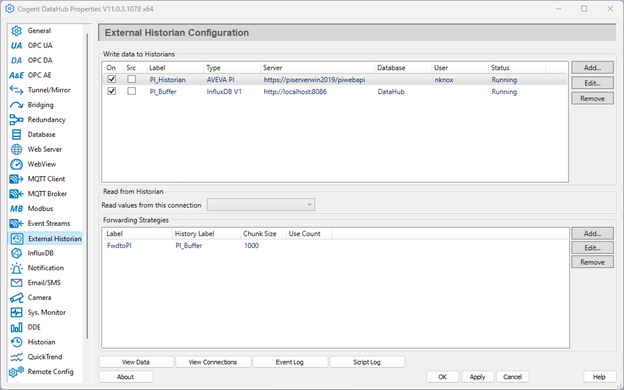
Results: Seamless Store and Forward for PI Historian
And you’re done! With these steps, your Cogent DataHub will use InfluxDB to store unsent data to be historized in PI in the event of a connection break. Store and Forward can be added to any historian supported by Cogent DataHub, including AVEVA Historian or Insight, OPC Classic HDA, Apache Kafka, and more. It can additionally leverage existing ODBC databases for many potential implementations.
Ready to Try It?
Want to try it out? You can download Cogent DataHub here, and our solutions team is available to answer questions and help you design your architecture. You are welcome to reach out to us by submitting this form with your inquiry. And don’t forget to subscribe to this blog for more tutorials and tips on our industrial automation solutions.