In the ever-growing digital landscape of manufacturing operations, single use solutions & applications may solve issues, but also create their own data silos. These silos present multiple challenges (limited visibility, slower decision-making, security blind spots) and lead to missed opportunities due to the complex management of varying solutions. For example, OPC HDA is a standard utilized for collecting and sharing historical data across industrial automation technology solutions. Based on the standards of OPC DA, integration challenges arise due to the dependency of COM and remote DCOM connections, creating incompatibility with newer solutions and technologies.
Today we'll explore how Cogent DataHub was used to solve many of these integration headaches and silos by providing a middleware platform for connectivity between a variety of protocols and technologies. With the latest major revision of Cogent DataHub V11, the ability to collect historical OPC HDA data is now possible with the addition of the OPC HDA Client capability.
Eliminate OPC HDA Silos: A Better Way to Share Historical Data
OPC HDA is a standard utilized for collecting and sharing historical data across industrial automation technology solutions. Based on the standards of OPC DA, integration challenges arise due to the dependency of COM and remote DCOM connections. This can cause data to become siloed in single use applications, increasing the burden of sharing data across your organizations.
Cogent DataHub has helped solve many of these integration headaches and silos by providing a middleware platform for connectivity between a variety of protocols and technologies. With the latest major revision of Cogent DataHub V11, the ability to collect historical OPC HDA data is now possible with the addition of the OPC HDA Client capability.

Understanding OPC Historical Data Standards
Before we dive into the solution, let's clarify the key technologies involved. If you've been working in industrial automation, you've likely encountered various OPC acronyms to describe common communications between systems. Here's what you need to know about the two historical data standards we'll be discussing.
What is OPC HDA?
OPC HDA (Historical Data Access) is the original standard for accessing historical process data from historians and data archives. Developed in the early 2000s, OPC HDA allows applications to retrieve time-series data that has already been collected, like a simple temperature reading. While the standard Data Access profile of OPC DA only operates in real-time data transmission.
OPC HDA is built on older COM/DCOM technology, which means it's Windows-dependent and can be difficult to configure across networks (DCOM) or with modern cloud platforms that are platform independent.
What is OPC UA HA?
OPC UA HA (Historical Access), also called OPC UA HA, is the modern evolution of historical data access. Built on the OPC UA (Unified Architecture) specification, it serves the same core purpose as its predecessor OPC HDA, accessing historical data. However, built off the newer standards offering platform-independence being TCP/IP based and includes built-in security.
Modernizing Historical Connections
With the continued growth and adoption of OPC UA across the industry, many applications now offer the OPC UA HA profile as an evolution of the classic OPC HDA offering. These profiles are uniquely different from the typical Data Access profiles of both OPC DA and UA. Many applications support real-time data transaction, but historical data has its own place & value within industrial operations.
For many end-users, the collection and management of historical data is not new, and existing systems are in-place and housing valuable information for years about their operations. However, unlocking this valuable data to newer initiatives, platforms, analytic & AI tools can be a struggle due to the older technology limitations.
Newer platforms may not offer legacy connectivity for OPC HDA and choose to deploy the newer OPC UA HA capabilities built off the OPC UA specification. This can create incompatibility with existing systems who only offer the older connection type. Cogent DataHub bridges the gaps in connecting both old & new systems without costly replacements of prior solutions, or custom coding integrations that are hard to manage long-term.
Protocol Conversion Tutorial
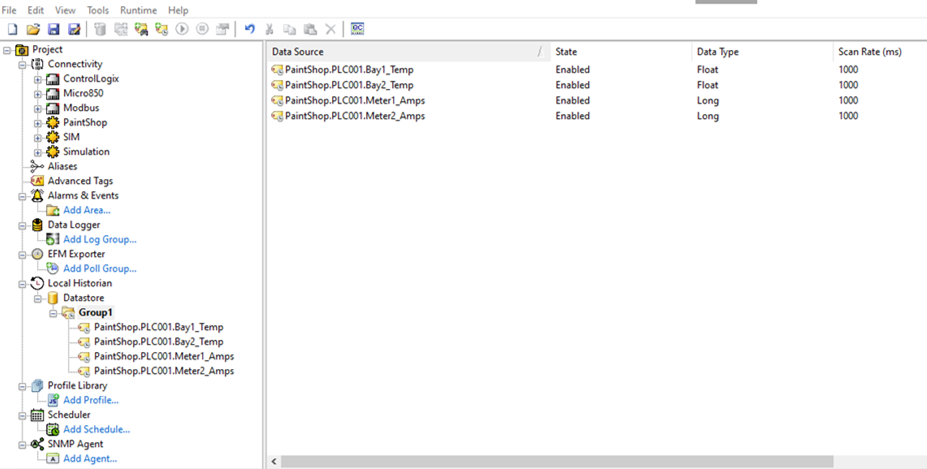
To convert classic OPC HDA data to the newer standard of OPC UA HA you must first have access to an OPC HDA capable server. In the following setup, we are connecting to TOP Server/KEPServerEX as our source. With its local historian, real-time tag values can be captured, stored, and presented to OPC HDA clients for further trending and analysis.
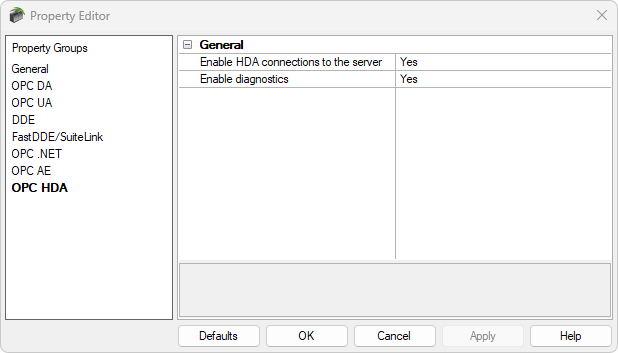
Below, a group of tags are defined to scan and historize their values every second. The OPC HDA interface must be enabled on the server to allow client connectivity.
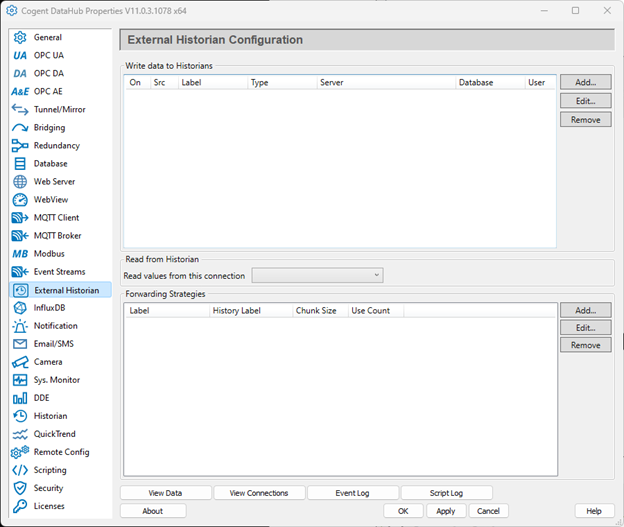
 Within Cogent DataHub, the OPC HDA plug-in is found under the External Historian tab. Selecting Add at the top-right will open a new configuration window, under Historian Type Classic OPC HDA can be selected.
The main connection requires the computer location, as Cogent DataHub is installed on the same machine as my TOP Server instance we can use Localhost. Once defined, the Server section will query the computer for registered OPC HDA Servers. 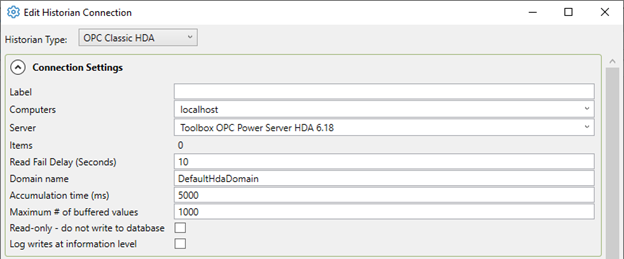
Once the server connection is defined, points may be selected in the bottom section, this will determine which tags are made available in the Cogent DataHub namespace. 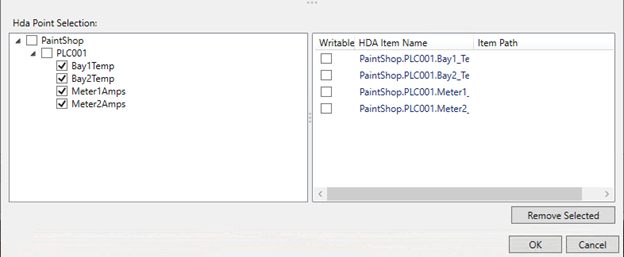
Once you have selected the points of interest, select OK to save the configuration. Ensure the checkbox for On & Src (source) are enabled, then select apply. 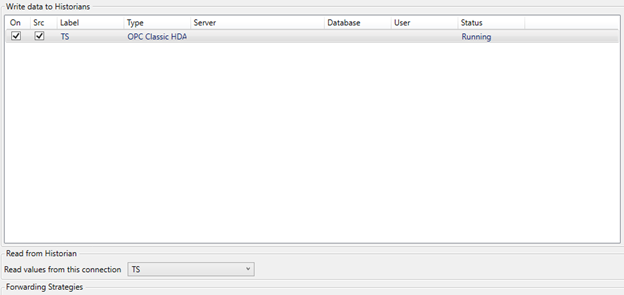
On the same page ensure “Read from Historian” is filled to match the label of the new OPC HDA connection just created. This allows for any connecting systems that access historical data, such as OPC UA HA clients, to read from the specified connection.
OPC UA HA Client Configuration
Now that Cogent DataHub ii is successfully configured to read values from our classic OPC HDA Server we can utilize an OPC UA HA client to connect to Cogent DataHub directly to view and trend our historical values.
Below is UA Expert, a handy testing tool from Unified Automation that provides a convenient and free testing tool for multiple OPC UA profiles, including Historical Access. 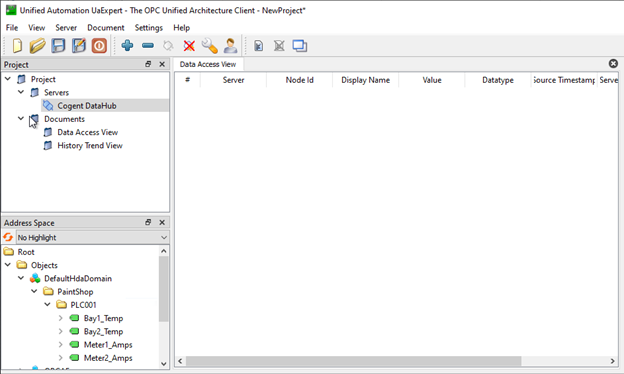
First connect to Cogent DataHub’s OPC UA Server via the UA Endpoint details. Once a connection is established, all data domains, including where the historical values were defined, will show as available objects to browse. As these values are not standard real-time tags, they will not display in a meaningful way from the standard Data Access View. Instead, navigate to Document > Add and choose History Trend View. 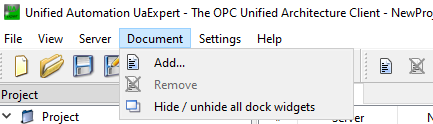
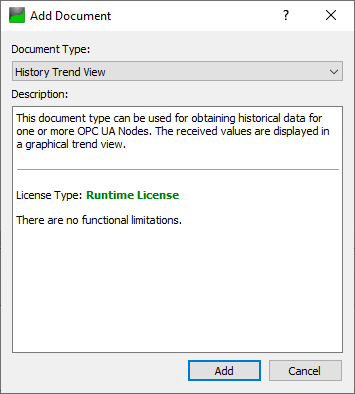
Now drag the set of tags under the DefaultHdaDomain into the configuration window. We can adjust the display time frame and select Update to display our captured values over the last period. 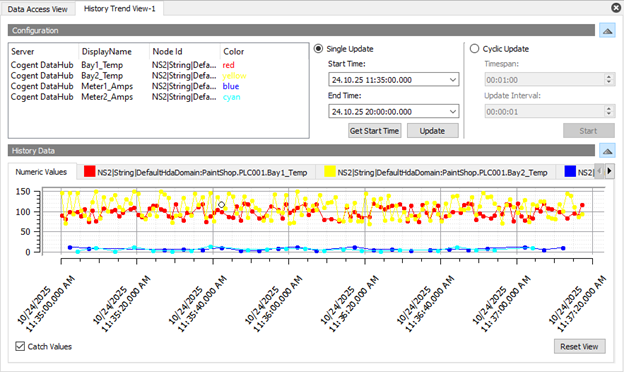
We have successfully converted our classic OPC HDA interface to the new standard of OPC UA Historical Access, enabling new systems and applications to communicate with existing infrastructure. 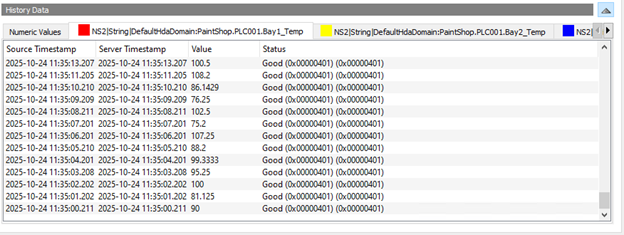
Beyond Conversion
Cogent DataHub can help unlock your historical data beyond conversion to new standards. With the wide variety of integration support, OPC HDA values can be shared with other historian platforms such as OSI PI, AVEVA Historian, AWS Kinesis or Database systems that support ODBC and Influx DB. Cogent DataHub can also leverage store-and-forward capabilities to reliably move historical data across systems even when downtime occurs. This is just a few of the many ways Cogent DataHub can help break down digital silo’s and expand the reach, and value, of your organization’s data. 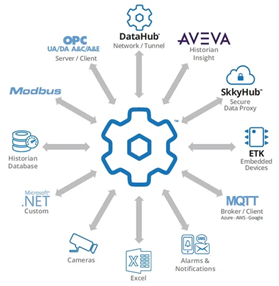
Ready to Try It?
Want to try it out? You can download Cogent DataHub here, and our solutions team is available to answer questions and help you design your architecture. You are welcome to reach out to us by submitting this form with your inquiry. And don’t forget to subscribe to this blog for more tutorials and tips on our industrial automation solutions.