

As the Industry 4.0 movement transforms industrial automation, engineers and system administrators are tasked with managing more devices, across more locations, and under tighter security policies. For those working with TOP Server or KEPServerEX, the need for secure and scalable configuration tools has never been more critical.
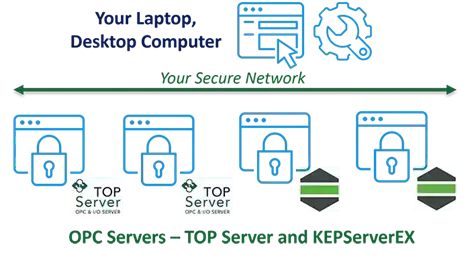
The OPC Server Remote Configuration Client enables direct configuration of remote TOP Server or KEPServerEX instances from your local machine, eliminating the need for remote desktop sessions, cloud access, or additional agents. Running entirely within your network, it ensures secure user access through the server’s built-in User Manager and offers an optional SQL audit trail for tracking configuration changes such as user identity and value changes.
In this blog, you’ll see how the OPC Server Remote Configuration Client streamlines server management and enhances efficiency in high-security environments, helping accelerate digital transformation throughout your operations.
Software Toolbox Technical Blog
Video Tutorial: Get Started with the OPC Server Remote Config Client
3 min read

By Abrey Austin on May 15, 2025 2:00:00 PM
Configure TOP Server and KEPServerEX Remotely and Securely
5 min read
By Blake Giler on Sep 26, 2024 2:00:00 PM
The TOP Server® from Software Toolbox and KEPServerEX® from the Kepware division of PTC® are well known connectivity solutions for extracting industrial automation data from PLCs and other devices, and integrating that data with virtually any HMI, SCADA, MES, Historian, or database on the market. These products have a global installed base serving sophisticated users across every industry imaginable.
About this Blog
We're engineers like you, so this blog focuses on "How to" appnotes, videos, tech team tips, product update announcements, user case studies, and other technical updates. Subscribe to updates below. Your feedback and questions on posts are always welcomed.
Subscribe to our Blog
Recent Posts
Posts by Topic
- Device Connectivity (204)
- Wonderware (178)
- OPC UA (121)
- Cogent DataHub (110)
- TOP Server (107)
- OPC (103)
- Technical Support (99)
- OmniServer (72)
- Video Tutorials (69)
- OPC Router (51)
- OPC DA (42)
- Protocols (40)
- AVEVA (37)
- Automation 101 (28)
- Security (26)
- MQTT & IoT (24)
- OmniServer Did You Know (24)
- Data Tunneling (23)
- OPC Data Client (22)
- Connectivity (21)
- Development Tools (19)
- IT/OT (18)
- DCOM (17)
- LGH (14)
- OPC Tunnel (13)
- Alarms & Notifications (12)
- Database (12)
- Earth Day (12)
- Summer of IoT (12)
- Exploring OPC UA (11)
- OPC Gateway (11)
- Case Studies (10)
- Dream Report (10)
- EFM (10)
- Oil & Gas (10)
- REST & Web Services (10)
- Reporting (10)
- CSV (9)
- Database & Historian (9)
- Flow (8)
- OPC Integration (8)
- Redundancy (8)
- Sustainability (8)
- AVEVA OPC UA Client (7)
- Modbus (7)
- OPC Router Basic Training (7)
- OPC Server (7)
- SuiteLink (7)
- DataHub Training (6)
- ODBC (6)
- OPC Alarms and Events (6)
- OPC Data Logger (6)
- ProtocolDesign (6)
- xml (6)
- Data Bridging (5)
- Data Logging (5)
- Data Storage Deep Dive (5)
- OPC Conversion (5)
- Data Integration (4)
- InTouch (4)
- Industrial Decisions (4)
- OPC Bridge (4)
- OPC Toolkit Benefits (4)
- OmniServer User Stories (4)
- SLIK-DA (4)
- SQL (4)
- Business Intelligence (3)
- Error Detection (3)
- IT & Infrastructure (3)
- Industry 4.0 (3)
- OPC Redundancy (3)
- OPC Server Remote Config (3)
- Wedges (3)
- Windows (3)
- Collaboration (2)
- ControlLogix (2)
- Excel (2)
- Ignition (2)
- KEPServerEX (2)
- Kepware Edge (2)
- OPC Wizard (2)
- OSIsoft (2)
- Omron (2)
- PGAS (2)
- Predictive Maintenance (2)
- Process Alert (2)
- Scripting (2)
- Store and Forward (2)
- System Integrators (2)
- Building Automation (1)
- ERP (1)
- LGH User Stories (1)
- LRC (1)
- Linux (1)
- Machine Learning (1)
- Mining/Metals (1)
- Omni Flow (1)
- Power & Utilities (1)
- Predictive Analytics (1)
- Process Alerts (1)
- QNX (1)
- Sparkplug B (1)
- Water & Wastewater (1)
