 This post is part of our Summer of IoT blog series, where we spotlight practical tools that solve real-world industrial challenges. In this installment, we dive into how DataCaster helps teams visualize key metrics, quickly, clearly, and without the hassle.
For engineers and operations teams, getting the right data in front of the right people at the right time can make all the difference. But too often, valuable metrics like uptime, downtime, production rates, and OEE stay buried in PLCs, SCADA systems, or databases, while teams rely on outdated methods like whiteboards, spreadsheets, or even handwritten notes.
If you’ve ever said, “I just want to see this data on a screen over there so the team can act on it,” there’s now a straightforward way to do just that, without writing code, managing a PC, or spinning up an IT project.
DataCaster: a Practical Way to Share Key Metrics Where It Counts
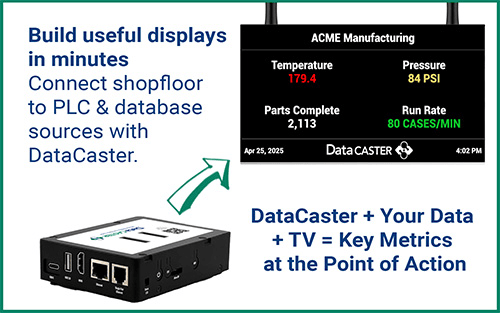
DataCaster is an easy to deploy device that allows you to display real-time production metrics on any HDMI-compatible screen, from dashboards in the control room to shop-floor TVs in the operator’s line of sight. It connects directly to your industrial data sources and displays configurable layouts tailored to your needs.
- No PC required
- No additional software to install
- Configured via your browser
- Installs in under an hour
Why Engineers Choose DataCaster for Industrial Data Display
DataCaster was built for people working on the plant floor: engineers, supervisors, and system integrators who need quick, reliable data and information without unnecessary complexity. It’s a hardware-based solution designed for industrial environments that puts live operational data on any standard HDMI display—quickly, reliably, and without writing code or deploying complex software.

Discover the key benefits you’ll gain with DataCaster
- Real-Time Visibility with Minimal Setup - Connect directly to PLCs (starting with the Allen-Bradley Logix family), Microsoft SQL/SQL Express, PostgreSQL, or use REST to bring in data values from other applications like OPC Router. Once set up, you can display values from one or many sources on the same screen.
- No Software to Install - Configuration is done through a browser—no separate apps or software required. The device handles layout, display, and refresh logic.
- Installs in Minutes - with a simple setup: connect to a wired or wireless network, plug the HDMI output into any standard TV or monitor, power the device via USB (using the display’s port or the included power supply), and mount it directly behind the screen using the included adhesive.
- Resilient by Design - If power is lost, the device reboots and re-establishes connections automatically, no intervention needed.
Explore practical use cases that show what DataCaster can do
- Shift supervisors can view OEE, cycle times, or downtime events as they happen
- Line operators can see if they’re on track with daily targets
- Engineers can surface alerts, sensor data, or quality metrics where they’re needed
- Lean and CI teams can replace manual tracking boards with live displays
Whether it’s a single production cell or multiple screens across a facility, DataCaster can scale to fit the job, especially when paired with other tools in the Software Toolbox ecosystem.
Go Live with DataCaster in 3 Simple Steps
- Connect your data - Configure connections to supported PLCs, databases, or software using the built-in browser interface.
- Build your layout - Define how the data should appear, use built-in formatting and test it live.
- Connect your screen - Use the supplied HDMI and power cables, mount the unit, and you’re done.
DataCaster is Built for Engineers, Not IT Projects
DataCaster is designed to solve a specific, practical challenge: getting real-time operational data in front of the people who need it, without added complexity. It doesn’t replace your SCADA, HMI, or analytics tools, it works alongside them to increase visibility where it matters most.
For just $895, with three simple setup steps, you can go from unboxing to live data on a screen in under an hour, no software installs, no coding, and no IT support required.
If you’re an engineer looking for a lightweight, OT-ready solution to display critical metrics at the point of action, DataCaster is worth a closer look.
Do you want to see more of DataCaster's ease of use?
Start with the Quick Start Guide to go from unboxing to live data on screen in under an hour, no software installation, no coding, and no IT support required.