Software Toolbox Technical Blog

No Code How to Implement Custom Protocols for Non-Standard Devices

6 min read

By Kevin Rutherford on Dec 21, 2017 2:00:00 PM


So remember in our blog post last month where you just have a protocol document from the manufacturer for a device you need to integrate with your control system?  And for this new device, there is no existing, off-the-shelf connectivity driver or server available.

And remember asking yourself, “How do I connect to this non-standard device?”  With custom software development being very expensive and time-consuming, we discussed a better way using OmniServer.

This post, the second of three, goes beyond the protocol details we gathered from the document in our blog post last month to provide the basics on how to actually use those details to build a working protocol in OmniServer without custom code for a fast, affordable solution with industry-standard client interfaces including as OPC DA and UA.

Continue Reading

Your Protocol Document and Integrating a Non-Standard Device

10 min read

By Kevin Rutherford on Nov 9, 2017 2:00:00 PM


So you've been tasked with bringing data from a new device (maybe a weigh scale or barcode scanner or RFID system) into your HMI/SCADA system.  But you just have a protocol document from the manufacturer.  And for this new device, there is no existing, off-the-shelf connectivity driver or server available.

So what now? Do you contact a custom software development house?  That gets very expensive and time-consuming very quickly.

This post, the first of three, goes through what to look for in that protocol document from the manufacturer to know how to begin using OmniServer to integrate your device without requiring custom code in a fast, affordable manner that provides industry-standard client interfaces such as OPC DA and UA.

Continue Reading

Video Tutorial: Using Registers in an OmniServer Protocol

1 min read

By Kevin Rutherford on Aug 10, 2017 2:00:00 PM


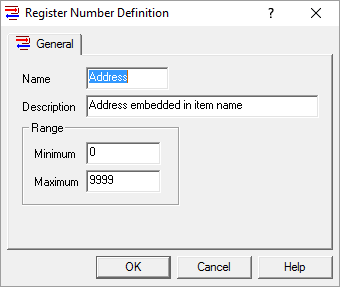
A Register Number is a time-saving special OmniServer element that allows you to configure one item that is requesting the same type of memory or offset in a device instead of one item for each memory or offset location.

In this video blog, I show you how to get started using registers to more efficiently build an OmniServer protocol without having to manually create an item for every piece of data whenever possible.

Continue Reading

Did You Know? OmniServer Topic Variables Can Turn One Protocol into 100

6 min read

By Kevin Rutherford on Jul 27, 2017 2:00:00 PM


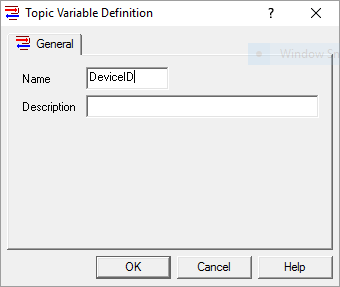
Do you have a multitude of non-standard devices with unique identifiers such as a Device IDs or Node IDs that must be sent as part of all protocol messages to communicate with each device?  If so, you could certainly accomplish this by hard coding your Device/Node IDs as part of each message in your OmniServer protocol and simply have a separate protocol for each device.

But OmniServer has a better way:  Topic Variables.  In this sixth post in our “OmniServer Did You Know?” blog series, you'll learn how to use Topic Variables to create one flexible protocol that you can use across any number of devices using the same communication protocol.

Continue Reading

Did You Know? You Can Initialize Your Device with OmniServer

4 min read

By Marc Holbach on Jul 13, 2017 2:00:00 PM


Does your non-standard instrument connected to your COM1 serial port refuse to communicate without being told how? Do you need to tell the instrument what bank of memory to use before you can extract any data? Does the instrument require setup parameters before it will work? Do you not want to script this in your client application, and don’t want to expect a user to manually initialize a device before doing anything else?

With OmniServer, there is an auto-activated message flag that's exactly the feature you have been looking for when communicating with your non-standard devices and instrumentation.  This fifth post in our "OmniServer Did You Know?" blog series focuses on how to use OmniServer's setting for auto-activating a command protocol message to initialize communications with your device automatically on startup.

Continue Reading

Did You Know? Monitoring OmniServer Polling Statistics

4 min read

By Marc Holbach on Jun 22, 2017 2:00:00 PM


A common question I run into when talking to OmniServer users is "How can I gain more visibility into what is going on with my OmniServer."  After all, a primary concept for an OPC Server is to be invisible – to be a transparent converter between the protocol used by a device, and that used by your SCADA or HMI (i.e. OPC, Wonderware SuiteLink, etc.).

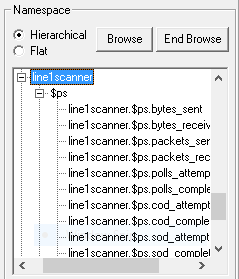
While there are a number of answers to how you can be more aware of what is going on with your system, this fourth post in our "OmniServer Did You Know?" blog series focuses on the importance of system tags, and specifically how they can be used in the OmniServer to query the health of the server as a whole, as well as individual device connections.

Continue Reading

Did You Know? How to Set Initial Values in OmniServer

4 min read

By Kevin Rutherford on Jun 1, 2017 2:00:00 PM


As you likely already know, OmniServer is primarily used to retrieve information from devices that use ‘non-standard’ protocols to communicate such as weight scales, barcode readers, and printers.

But were you aware that OmniServer, as part of that function, is capable of specifying a default initial value for data items on startup?  In this third post in our "OmniServer Did You Know?" blog series, keep reading to find out how to use initial values for your data items in OmniServer and under what situations that will be important.

Continue Reading

Did You Know? OmniServer Can Retrieve Data From Web Services

4 min read

By Marc Holbach on May 4, 2017 2:00:00 PM


If you are familiar with the OmniServer, you probably already know that it can be used to retrieve information from devices that use ‘non-standard’ protocols to communicate – typically these are your weight scales, barcode readers, and printers.

However, did you know that the OmniServer can also retrieve data that are exposed via web services, or even websites?  Keep reading to find out you can "scrape" web sites or services to integrate useful information into your systems using OmniServer.

Continue Reading

About this Blog

We're engineers like you, so this blog focuses on "How to" appnotes, videos, tech team tips, product update announcements, user case studies, and other technical updates.  Subscribe to updates below. Your feedback and questions on posts are always welcomed.

Subscribe to our Blog

Recent Posts

Posts by Topic

See all