Software Toolbox Technical Blog

Video Tutorial: Using Registers in an OmniServer Protocol

1 min read

By Kevin Rutherford on Aug 10, 2017 2:00:00 PM


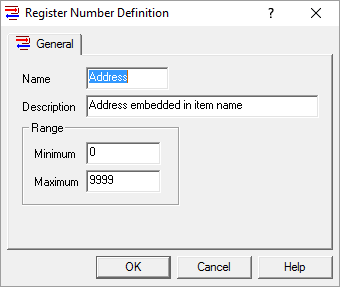
A Register Number is a time-saving special OmniServer element that allows you to configure one item that is requesting the same type of memory or offset in a device instead of one item for each memory or offset location.

In this video blog, I show you how to get started using registers to more efficiently build an OmniServer protocol without having to manually create an item for every piece of data whenever possible.

Continue Reading

TOP Server V6.2 for Wonderware - Mitsubishi Ethernet Expanded Model Support

4 min read

By Kevin Rutherford on Aug 3, 2017 2:00:00 PM


There are several useful updates available with TOP Server V6.2.  In case you missed it, I did a high-level post giving you an overview of the four biggest features from the V6.2 release - click here to see that post.

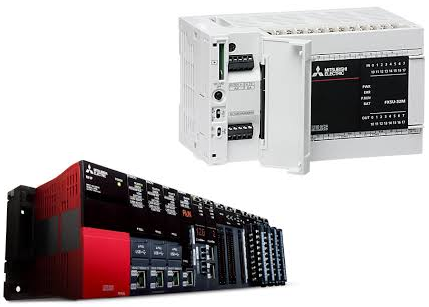
Today, I'd like to give you a more detailed review of the current model support available in the Mitsubishi Ethernet driver in TOP Server V6.2.  Keep reading to find out about new device model support and previous read and write performance enhancements that also apply for these newest models of Mitsubishi controllers.

Continue Reading

Video Tutorial: Integrating Wellsite Equipment using WITS Protocol

1 min read

By Kevin Rutherford on Jul 20, 2017 2:00:00 PM


The Wellsite Information Transfer Specification (WITS) is a communications format used for the transfer of a wide variety of oil & gas wellsite data from one computer system to another.  This oil/gas industry standard is recognized by a number of companies internationally and is supported by many hardware devices and software applications used at well sites around the globe.

In this video blog, I show you how to get started using our TOP server software based communications driver for WITS Level 0 Active protocol to integrate data from your wellsite devices into AVEVA (formerly Wonderware) applications. You can install the software on your own computer and it will communicate with multiple devices via multiple serial ports and/or Ethernet convertors. 

Continue Reading

Did You Know? You Can Initialize Your Device with OmniServer

4 min read

By Marc Holbach on Jul 13, 2017 2:00:00 PM


Does your non-standard instrument connected to your COM1 serial port refuse to communicate without being told how? Do you need to tell the instrument what bank of memory to use before you can extract any data? Does the instrument require setup parameters before it will work? Do you not want to script this in your client application, and don’t want to expect a user to manually initialize a device before doing anything else?

With OmniServer, there is an auto-activated message flag that's exactly the feature you have been looking for when communicating with your non-standard devices and instrumentation.  This fifth post in our "OmniServer Did You Know?" blog series focuses on how to use OmniServer's setting for auto-activating a command protocol message to initialize communications with your device automatically on startup.

Continue Reading

Did You Know? Monitoring OmniServer Polling Statistics

4 min read

By Marc Holbach on Jun 22, 2017 2:00:00 PM


A common question I run into when talking to OmniServer users is "How can I gain more visibility into what is going on with my OmniServer."  After all, a primary concept for an OPC Server is to be invisible – to be a transparent converter between the protocol used by a device, and that used by your SCADA or HMI (i.e. OPC, Wonderware SuiteLink, etc.).

While there are a number of answers to how you can be more aware of what is going on with your system, this fourth post in our "OmniServer Did You Know?" blog series focuses on the importance of system tags, and specifically how they can be used in the OmniServer to query the health of the server as a whole, as well as individual device connections.

Continue Reading

Did You Know? How to Set Initial Values in OmniServer

4 min read

By Kevin Rutherford on Jun 1, 2017 2:00:00 PM


As you likely already know, OmniServer is primarily used to retrieve information from devices that use ‘non-standard’ protocols to communicate such as weight scales, barcode readers, and printers.

But were you aware that OmniServer, as part of that function, is capable of specifying a default initial value for data items on startup?  In this third post in our "OmniServer Did You Know?" blog series, keep reading to find out how to use initial values for your data items in OmniServer and under what situations that will be important.

Continue Reading

TOP Server V6.1 - Mitsubishi Ethernet Improvements

4 min read

By Kevin Rutherford on May 25, 2017 2:00:00 PM


There are some powerful new features available with TOP Server V6.1.  In case you missed it, I did a high-level post giving you an overview of the six biggest features from the V6.1 release - click here to see that post.

Today, I'd like to give you a more detailed review of the great improvements made to the Mitsubishi Ethernet driver in TOP Server V6.1.  Keep reading to find out about new device model support and some great increases in read and write performance for communication with your Mitsubishi controllers.

Continue Reading

Video Tutorial: Securely View & Control USB Cameras with Cogent DataHub

1 min read

By Win Worrall on Apr 6, 2017 2:00:00 PM


With the release of Cogent DataHub Version 8, we have had a lot of interest in new USB camera support functionality. The following short video blog demonstrates step-by-step just how easy it is use the Cogent DataHub to establish a connection to a USB Camera and then securely tunnel that data to another computer and then create a DataHub WebView page that will allow you to view the camera image and control the camera remotely.
Continue Reading

About this Blog

We're engineers like you, so this blog focuses on "How to" appnotes, videos, tech team tips, product update announcements, user case studies, and other technical updates.  Subscribe to updates below. Your feedback and questions on posts are always welcomed.

Subscribe to our Blog

Recent Posts

Posts by Topic

See all