Software Toolbox Technical Blog

Namibia Breweries Ltd leverages off-the-shelf OPC software for sustainable manufacturing in a tough environment

7 min read

By John Weber on Mar 1, 2018 2:00:00 PM


When you live in a remote region that is one of the most arid places on earth, you import your raw materials, and you’re making millions of hectoliters of beer a year, you have to make the most of all the resources you have and leverage what is in abundance in your location.  Namibia Breweries Ltd. (NBL) has a long history of success in a tough environment at their Windhoek site. They have received numerous awards for their innovative approaches to meeting their information system needs.

In this blog post, we’ll share their look into how they use off-the-shelf software and their teams' intellectual know-how and creativity to empower their manufacturing success.  If you read the stories in Automation World or Pro Food World you learned about how Andre Engelbrecht, manager of industrial control systems at NBL, and his teammates Annemarie Kruger, Rolando du Pisani and others unlocked data sources and built a digital smart manufacturing platform across the entire facility.  In this article, we’re going to share the rest of the story of NBL’s integration points, problems solved, and how they leveraged Software Toolbox’s full value proposition as part of their team effort.

Continue Reading

Integration of Vibration Monitoring Hardware into HMI, SCADA, MES, & Historians

1 min read

By John Weber on Feb 21, 2018 2:00:00 PM


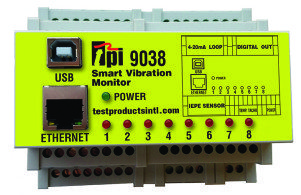
Software Toolbox has worked with integrators, users, OEMS and distributors of Wonderware Software products since 1997.  At a Schneider Electric Software conference in 2017, they met a hardware supplier new to the Wonderware user community, Test Products International, also known as TPI.  It turns out TPI is not new to the vibration monitoring space, though, and has a long history of providing handheld test and measurement equipment. In this video blog...

Continue Reading

Did You Know? Four Key OmniServer Tips For Easier Protocol Creation

7 min read

By Kevin Rutherford on Feb 8, 2018 2:00:00 PM


As someone who has worked with non-standard device connectivity using OmniServer for over 10 years, I sometimes take for granted the knowledge that I have gained over that time.  If you're anything like me, once you figure out the data you need from your device's protocol document, you just want to get your protocol knocked out as quickly as possible so you can start communicating.

In this post, I'm going to cover 4 key tips that I've learned over the years when working in OmniServer to build a protocol that you may not have realized and that could add convenience and save you a lot of time, which is time you can be spending on other important tasks.

Continue Reading

Automation & Control Software Learning Resources for the New Year

5 min read

By Kevin Rutherford on Jan 18, 2018 2:00:00 PM


The New Year is a time of renewal, new projects, new challenges, and for some of you, new roles, or new people on your teams.  The last year has been one where our team has grown and worked to deliver the relevant content you need to learn more about software for automation & control, how to use our products, and the type of problems we solve.

In this blog post, we’ll provide a quick review of some key items from the last year that can help you or your colleagues in the coming year.  If you aren’t already subscribed to our blog, we encourage you to subscribe using the form at the right . We publish new content at least once a week, sometimes more often, and you can control the frequency of when you are notified of new content.

Continue Reading

How to Connect a Non-Standard Device with No Code

8 min read

By Kevin Rutherford on Jan 4, 2018 2:00:00 PM


l ask you to remember back to our blog post last month where took the information we pulled from a device’s protocol document (in the prior month's blog) and created a custom protocol in OmniServer.  As you’ll recall, our protocol has now been designed.

But how do you go about testing the protocol and proving that it works? This final post in the series takes you through the steps of getting connected and actually troubleshooting your OmniServer protocol.

Continue Reading

No Code How to Implement Custom Protocols for Non-Standard Devices

6 min read

By Kevin Rutherford on Dec 21, 2017 2:00:00 PM


So remember in our blog post last month where you just have a protocol document from the manufacturer for a device you need to integrate with your control system?  And for this new device, there is no existing, off-the-shelf connectivity driver or server available.

And remember asking yourself, “How do I connect to this non-standard device?”  With custom software development being very expensive and time-consuming, we discussed a better way using OmniServer.

This post, the second of three, goes beyond the protocol details we gathered from the document in our blog post last month to provide the basics on how to actually use those details to build a working protocol in OmniServer without custom code for a fast, affordable solution with industry-standard client interfaces including as OPC DA and UA.

Continue Reading

Top 3 TOP Server V6.4 Features to Be Excited About

4 min read

By Kevin Rutherford on Dec 14, 2017 2:00:00 PM


If you haven't received one of my emails or heard from a colleague about our latest TOP Server release, you may not have heard about the key new features in the TOP Server V6.4 release.

In this post, I'm going to go through the top 3 key features released in V6.4 in more detail and how they benefit you as a TOP Server user.

Continue Reading

Your Protocol Document and Integrating a Non-Standard Device

10 min read

By Kevin Rutherford on Nov 9, 2017 2:00:00 PM


So you've been tasked with bringing data from a new device (maybe a weigh scale or barcode scanner or RFID system) into your HMI/SCADA system.  But you just have a protocol document from the manufacturer.  And for this new device, there is no existing, off-the-shelf connectivity driver or server available.

So what now? Do you contact a custom software development house?  That gets very expensive and time-consuming very quickly.

This post, the first of three, goes through what to look for in that protocol document from the manufacturer to know how to begin using OmniServer to integrate your device without requiring custom code in a fast, affordable manner that provides industry-standard client interfaces such as OPC DA and UA.

Continue Reading

About this Blog

We're engineers like you, so this blog focuses on "How to" appnotes, videos, tech team tips, product update announcements, user case studies, and other technical updates.  Subscribe to updates below. Your feedback and questions on posts are always welcomed.

Subscribe to our Blog

Recent Posts

Posts by Topic

See all