Software Toolbox Technical Blog

Using MQTT to Stream OPC data to Digital Twins in Azure IoT Hub

3 min read

By Win Worrall on Sep 3, 2020 2:00:00 PM


Cogent DataHub is always expanding its wide range of flexible connectivity options between different data sources such as MQTT, OPC UA, OPC DA, ODBC, DDE and so much more.  With the advent of IIoT and its increasing adoption across industries, connectivity to various traditionally non-IIOT data sources via MQTT is key.

If you're not familiar with the concept of a virtual or digital twin, it's the idea of virtual modeling a physical asset or system.  Ultimately, the key motivators for creating digital twins is having the ability to accurately model and predict what will happen with the real-world physical equivalent of that digital twin.  Digital twins are extremely beneficial towards predictive analytics used for pro-active maintenance and process optimization across industries.

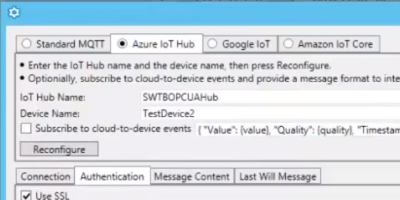
In this next installment of our Cogent DataHub Virtual Training series, we will cover step-by-step how to easily connect and push data from OPC data sources to digital twins in the Azure IoT Hub including how to optionally do so through a network DMZ (DeMilitarized Zone) using an additional DataHub as a proxy server for even greater security.

Continue Reading

Video How-To: Connect Non OPC-UA Clients to UA Servers with TOP Server

2 min read

By Kevin Rutherford on Aug 27, 2020 2:00:00 PM


While TOP Server for AVEVA™, formerly Wonderware provides connectivity to hundreds of device types and protocols, that is only part of how TOP Server helps with integrating industrial process data with external software such as AVEVA™ System Platform, formerly Wonderware and other client applications.

You're likely aware that TOP Server is an OPC UA server.  But TOP Server can also act as an OPC UA client for integrating with other OPC UA servers, as well.  For situations where you have a UA server to integrate but your client does not support OPC UA, but does support one of TOP Server's other client interfaces, TOP Server can be the gateway solution. This is especially valuable for AVEVA users who wish to keep using AVEVA Suitelink, OPC DA, or have not migrated to a version of AVEVA applications that support OPC UA Client functionality. 

In this video blog, I'll show you how to make a secure OPC UA connection from TOP Server to other OPC UA servers supporting the Data Access profile.  We cover the basics of configuring the OPC UA Client driver in TOP Server and making an OPC UA connection to another OPC UA server.

Continue Reading

Key TOP Server for AVEVA V6.9 Features to Be Excited About

3 min read

By Kevin Rutherford on Jun 11, 2020 2:00:00 PM

In keeping with ongoing continuous improvement initiatives, TOP Server for AVEVA V6.9 expands connectivity support for several existing drivers.  This is in addition to other updates to over 25 drivers and plug-ins.

In this post, we'll cover the key features released in V6.9 in more detail, including updates to OPC UA Client driver data types and tags for EUROMAP 77 compatibility, support for additional GE Fanuc Focas parameters, expanded Torque Tool Ethernet message IDs and more, including how they benefit you as a TOP Server user.

Continue Reading

Connect Your Barcode Scanners to Barcode Printers

2 min read

By Kevin Rutherford on May 28, 2020 2:00:00 PM

Barcode scanners and printers are devices that are very common in a variety of industries, whether it's for use in a manufacturing process or a multitude of other possible uses.  But how do you go from scanning a barcode to printing that barcode?

In this video, we will cover how to connect to both a Datalogic barcode scanner and a Zebra barcode printer, as well as, transferring the scanned barcode data to the printer automatically.

Continue Reading

Tech Support Corner: Protecting Your TOP Server OPC UA Process Data

6 min read

By Tyler Lindsey on May 14, 2020 2:00:00 PM


With the rising security demands of Industry 4.0, OPC UA provides us with the means to encrypt data as it is transferred between client and server. But what if encrypting data to prevent outside extraction is not enough? What if UA client applications become compromised? What tools do we have to protect against deliberate or even accidental manipulation or consumption of data?

Continuing our Tech Support Corner blog series, this post covers how to leverage the built-in TOP Server User Group Security settings, alongside OPC UA username and password authentication, for greater control over which users have read/write capabilities as well as what tags a user is permitted to access.

Continue Reading

Top 5 Time-Saving Features of the OmniServer Visual Protocol Editor

5 min read

By Kevin Rutherford on Apr 30, 2020 2:00:00 PM


If you know nothing else about OmniServer, you probably know it is commonly used for accessing information from devices that use ‘non-standard’ protocols including such devices as weight scales, barcode readers, and printers either over serial connections or Ethernet connections.

From its beginnings 25 years ago, OmniServer was designed to save time and effort when integrating your "other" devices, especially when compared to the time, effort and cost of alternatives such as custom code.

In this blog post, we will step through the 5 most time-saving features of OmniServer's Visual Protocol Editor, including short demo videos of each feature, highlighting how they can help you save up to 40% more of your time and effort when configuring an OmniServer protocol to communicate to your other devices.

Continue Reading

Top 7 Dream Report Features to Be Excited About in V5.0 R20-1

4 min read

By Kevin Rutherford on Apr 9, 2020 2:00:00 PM


If you haven't used Dream Report previously, Dream Report is a real-time report generator and dashboard solution that is quickly and easily configurable for data collection, archival of data and alarms and also analysis.

In this post, we'll go through 7 key features of the V5.0 R20-1 release of Dream Report and how those features benefit existing and new Dream Report users.

Continue Reading

Video Tutorial: Using OmniServer with Ignition SCADA via OPC UA

2 min read

By Kevin Rutherford on Mar 26, 2020 2:00:00 PM


OmniServer's connectivity and data parsing capabilities are its primary job; however, they are only the part of how OmniServer helps with integrating non-standard devices with Inductive Automation's Ignition HMI/SCADA.  How does the device data actually make it into Ignition?

In this video blog, I'll show you how to make an OPC UA client connection from Ignition to OmniServer for integrating process data from all of your "other" devices that don't have a standard, off-the-shelf driver - and all without the expense and headaches of having to write custom code.

Continue Reading

About this Blog

We're engineers like you, so this blog focuses on "How to" appnotes, videos, tech team tips, product update announcements, user case studies, and other technical updates.  Subscribe to updates below. Your feedback and questions on posts are always welcomed.

Subscribe to our Blog

Recent Posts

Posts by Topic

See all