Software Toolbox Technical Blog

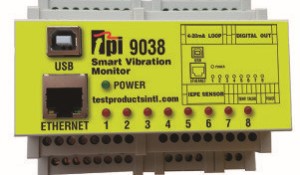
Video Tutorial: Ignition SCADA to TPI Vibration Monitors w/ OmniServer

2 min read

By Kevin Rutherford on Sep 16, 2021 2:00:00 PM


OmniServer's connectivity and data parsing capabilities are its primary job; however, they are only part of how OmniServer helps with integrating non-standard devices with Inductive Automation's Ignition HMI/SCADA.  How does the device data actually make it into Ignition and what devices can you connect Ignition to using OmniServer?

In this video blog, I'll show you how to use OmniServer for TPI to integrate vibration data into Ignition via an OPC UA client connection from Ignition to OmniServer - all without the expense and headaches of having to write custom code.

Continue Reading

Tech Support Corner: 5 Tips for Using OPC Quick Client

8 min read

By Kevin Rutherford on Sep 2, 2021 2:00:00 PM


If you're a TOP Server for AVEVA (formerly Wonderware) user, you've certainly connected to a device configured in TOP Server using the included OPC Quick Client at one time or another. But if you've just been launching the Quick Client from the TOP Server toolbar, you may be missing some very useful features.

Continuing our Tech Support Corner blog series, this blog post covers five tips you can use to get the most out of your experience using the OPC Quick Client with TOP Server and other OPC DA servers.

Continue Reading

Tech Support Corner: Adding Friendly Topic Names in TOP Server

6 min read

By Kevin Rutherford on Apr 8, 2021 2:00:00 PM


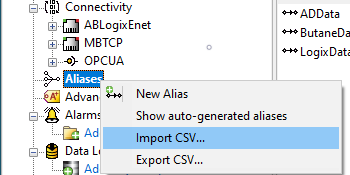
If you're a TOP Server for AVEVA (formerly Wonderware) user, you've certainly connected to a device configured in TOP Server using a topic name. But did you know you can create custom topics called aliases with any meaningful name you would like to represent your devices?

Continuing our Tech Support Corner blog series, this blog post covers how to easily add define meaningful aliases for your devices in TOP Server for use as topics in your client applications.

Continue Reading

Virtual Training: Adding OPC UA to Your Custom OPC DA Server

2 min read

By Ganesh Kalipershad on Feb 11, 2021 2:00:00 PM

With OPC DA Classic having been the de-facto standard for integrating industrial automation systems for so many years, I'm sure there are quite a few of you who might have custom developed OPC DA servers using SLIK-DA. Now, of course, migrations to OPC UA are on the rise with its enhanced security, encryption and efficiency.

Of course, the prospect of replacing that OPC DA server entirely with a replacement that supports OPC UA might be less than ideal. But have you considered adding an OPC UA server interface to that existing OPC DA custom application?

In this video blog, we teach you how to add an OPC UA Server interface to your existing OPC DA Server interface using the SLIK-DA/UA rapid development toolkit with your custom software application (NO ADDITIONAL CODE). If you missed our last post on how to add an OPC DA interface to your custom software, click here.

Continue Reading

Virtual Training: Making your Custom Software an OPC DA Server

2 min read

By Ganesh Kalipershad on Jan 28, 2021 2:00:00 PM

So your organization has a custom developed application that is performing some important task and you've been tasked with providing access to that software for an OPC DA client or clients. Adding an OPC DA server interface to a custom application that either you've developed or that you've taken over from someone else can be a daunting task.  This is especially true if you're unfamiliar with the low level nuts and bolts of the OPC DA Classic specification.

In this video blog, we teach you how to add an OPC DA Server interface to your custom software application using the SLIK-DA/UA rapid development toolkit.

Continue Reading

Video Tutorial: Convert OPC DA Servers to OPC UA using TOP Server

2 min read

By Kevin Rutherford on Nov 19, 2020 2:00:00 PM


TOP Server for AVEVA™, formerly Wonderware provides connectivity to hundreds of device types and protocols, but that's not all.  With the TOP Server OPC Client Suite, it's also possible to use your existing classic OPC DA and OPC XML-DA servers with OPC UA clients.

In this video blog, I'll show you how to make a secure OPC UA connection from OPC UA clients supporting the Data Access profile to TOP Server for integrating process data from OPC DA Classic servers using the TOP Server OPC DA Client driver.  I cover the basics of connecting to your OPC DA server and making an OPC UA connection using an OPC UA test client.

Continue Reading

Answers For When Your IT Team Asks about OPC UA's Network Impact

3 min read

By Marc Holbach on Oct 1, 2020 2:00:00 PM


The adoption of OPC UA technology continues to grow more with each passing year.  And for good reason.  OPC UA provides a means to encrypt data as it is transferred between client and server that other client interface options simply do not. But when it comes time to have that discussion with your IT department around whether they are going to let you run OPC UA inside the firewall on a network, they likely will have concerns centered around common IT concerns in networks. 

Continuing our Tech Support Corner blog series, this post covers some common concerns that our support engineers have encountered from process engineers collaborating with their IT department about OPC UA client's and servers running on their network and the factors to consider in those discussions. 

Continue Reading

Need to Export LGH File Data from a Remote InTouch System?

5 min read

By Marc Holbach on Sep 10, 2020 2:00:00 PM


Many of the great questions in life begin with the word ‘where’. Where do we come from? Where are we going? Where should I install my LGH File Inspector?

While I cannot provide a whole lot of input on the first two questions, I do have some suggestions on where to install your LGH File Inspector.

In this Tech Support Corner blog post, we will explore some common factors that we have seen impact, or drive, the ideal placement of an LGH File Inspector installation – a question that we get quite commonly from users like you.

Continue Reading

About this Blog

We're engineers like you, so this blog focuses on "How to" appnotes, videos, tech team tips, product update announcements, user case studies, and other technical updates.  Subscribe to updates below. Your feedback and questions on posts are always welcomed.

Subscribe to our Blog

Recent Posts

Posts by Topic

See all