

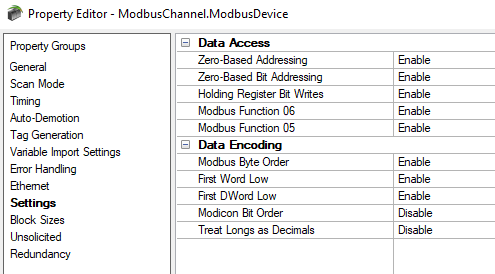
In the world of industrial automation and control systems, communication protocols play a crucial role in ensuring seamless data exchange between devices. Modbus started as a protocol used in Modicon, now Schneider Electric, PLCs in the 1970’s. It was adopted across the industry for its clarity and simplicity. With any protocol, including and especially with Modbus, there are areas where the parties to the communication, the client and server, can interpret the bit stream of data differently once exchanged because the Modbus protocol specification does not speak to those interpretations.
Data Exchange File Formats: Exploring ETL Tools with OPC Router
3 min read
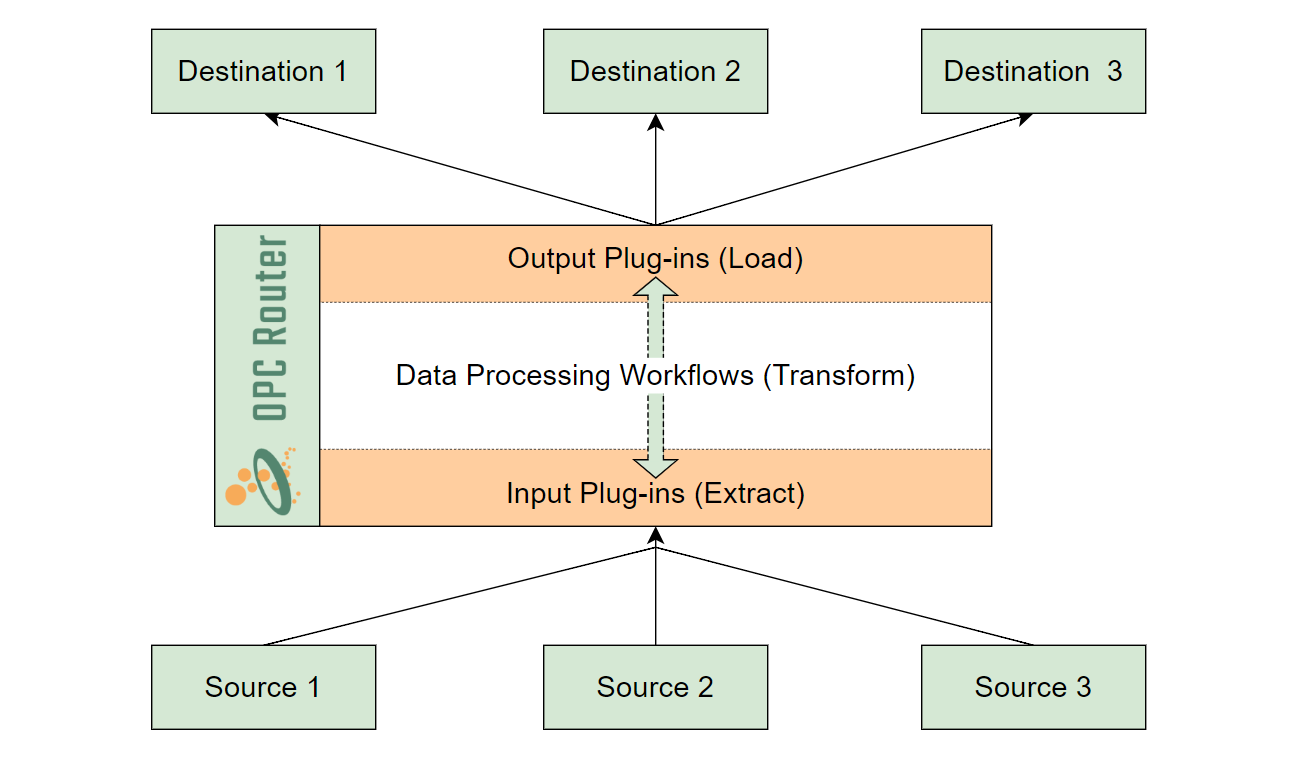
To achieve operational and business goals, many industrial automation system architectures are designed to push and pull data from a multitude of sources and destinations that come with a variety of formats. Bridging the gap between systems that use distinct standards and protocols can be challenging if the right tools aren't properly selected, and too often users resort to custom software. This is where users can leverage OPC Router’s ETL (Extract, Transform, Load) Tools—a valuable solution for seamlessly repackaging data across processes that use distinct standards or protocols.
In this article, we will briefly introduce the power of OPC Router’s ETL Tools, exploring a few use cases that highlight their role in structuring data into popular file formats. If you are not already familiar with what OPC Router is and what it can do for your particular process, you can visit the OPC Router website or the OPC Router Technical Guides with a Quick Start for New Users.
Exploring Cogent DataHub's Alarm & Notifications Plug-In
5 min read
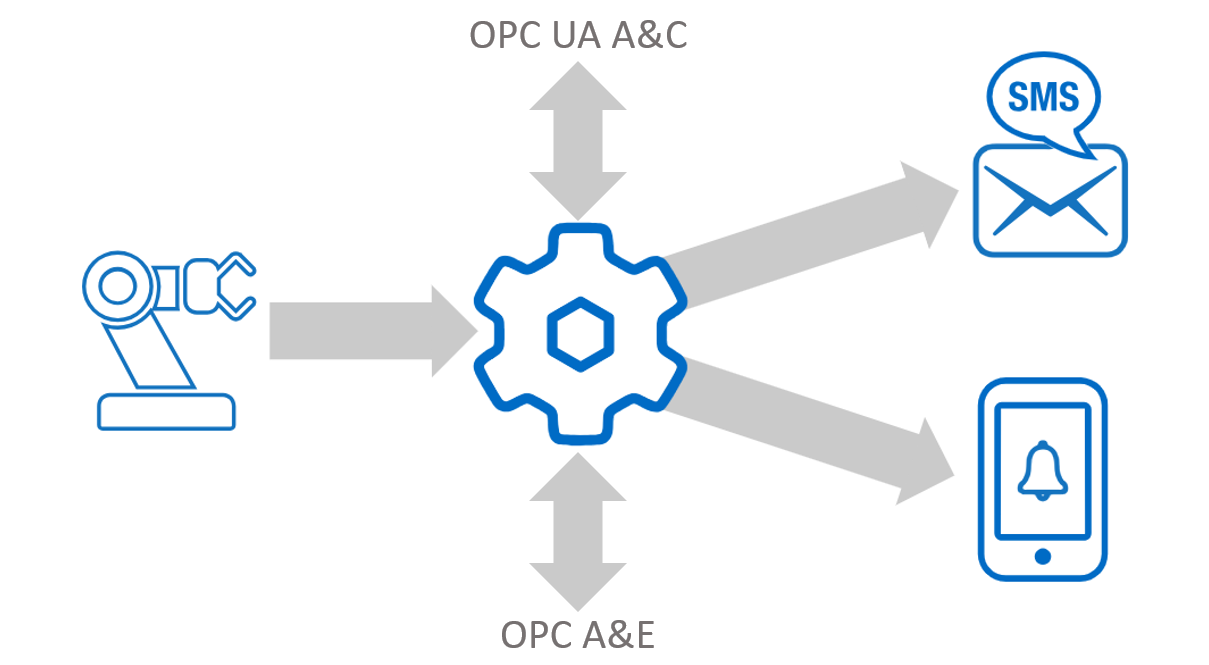
Cogent DataHub is primarily known for its extensive connectivity to OPC DA, OPC UA, OPC A&E, Databases, Historians, Excel, ODBC, DDE, Linux, Modbus and more. However, it is worth noting that this platform offers more than just connectivity. In this blog post, we'll cover the capabilities of DataHub’s Alarm & Notification Plug-In, which supports the configuration of custom alarms, events, and notifications. You can enhance your A&E Client applications by adding this feature to any DataHub License Pack, and generate alarms based on any data integrated into the DataHub, or simply send email/SMS alerts.
Topics:
Technical Support
OPC Alarms and Events
Alarms & Notifications
Cogent DataHub
System Integrators
Continue Reading
OPC Data Client 2023.2 Adds Python.NET Support
6 min read
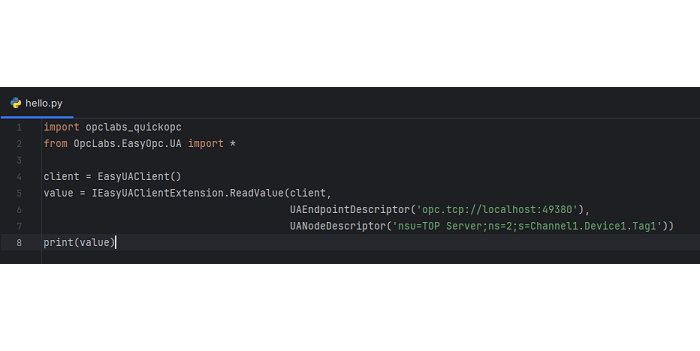
Developers that have leveraged our OPC Data Client toolkit for their custom OPC client development needs know that we’ve historically supported Python as a COM development language, but that had always come with limitations and a desire from our user base for a more modern option.
In the latest V2023.2 release, OPC Data Client now adds support for Python.NET, while also announcing the deprecation of the older COM approach. The newer Python.NET option offers many advantages including, but not limited to:
- Modern, maintained Python.NET package (pythonnet), instead of the older pypiwin32 package
- More than 270 Python.NET examples
- Support for PyCharm as a primary development environment.
- Added performance and reliability that comes from using the OPC Data Client .NET API over the COM API
- Access to .NET features, such as generics, methods overloads, and callbacks
- Easier coding
Now that we have a basic understanding of the advantages that Python.NET has over its predecessor, let’s see it in action!
Exploring MQTT – Understanding Quality of Service (QoS) with DataHub
7 min read
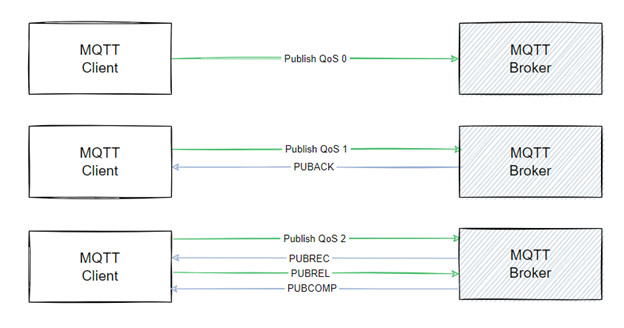
MQTT continues to grow in popularity and implementation within the industrial automation community. For those who are still new and learning about this protocol, MQTT is a light-weight transfer protocol built around a publish/subscribe architecture. In simple terms, MQTT can be compared to a mail envelope, providing structure and a common appearance with a supported delivery system, while the actual content of that envelope can vary widely.
Because of the ambiguity of message content, implementations of MQTT can be utilized for various needs across segments in our industry, though the varying message content presents its own issues that are outside the scope of this article. There are multiple solutions for providing structure and standards around the message content that we will discuss in future posts.
This blog will primarily focus on the reliability of message delivery based on the concept of Quality of Service (QoS). We will be utilizing the Cogent DataHub to showcase these options, as it can act as both the MQTT Broker & Client. It is important to note that this information can be applied to various MQTT implementations, including other Software Toolbox product offerings with MQTT, such as OPC Router or the TOP Server MQTT client driver.
Exploring TOP Server's Out-of-the-Box Security Features
10 min read
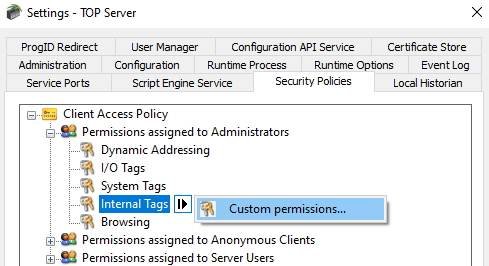
Whether you're running a production system in manufacturing, oil and gas, building automation, or energy, safety and uptime are of the utmost importance, especially with cybersecurity attacks increasing in frequency and complexity.
That’s why when running an application with widespread user access, managing user permissions and configurations is so important, and you need a solution that is as security centric as you are. In this blog post, we delve into how to manage user groups and permissions inside the TOP Server’s User Manager and Security Policies Plug-In to ensure a robust and secure gateway to your TOP Server Configuration.
Using OPC Router to Log OPC Data to JSON Files Without Code
9 min read
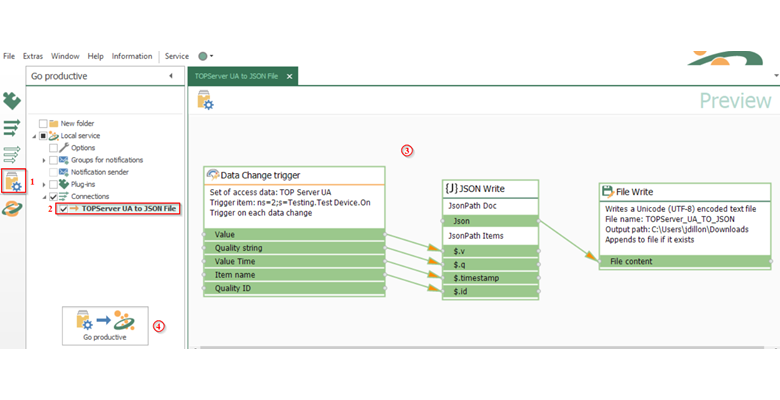
In today's business landscape, the exchange and storage of data plays a pivotal role in ensuring efficient and robust operations. Whether operating in sectors like Pharmaceuticals, Manufacturing, Power, or related industries, the exchange of data between services and applications has become standard practice, often an imperative. Consequently, many organizations leverage resources such as databases and historians to archive their invaluable data. However, there are instances where the need for simpler storage methods or direct interchange of data via Webservices is required to maximize application interoperability. Unfortunately, this solution area is often one filled with custom software applications. In this blog, we'll show you how to eliminate custom code and build sustainable solutions.
TOP Server Troubleshooting Scenario: Device Side Communication Issue
17 min read
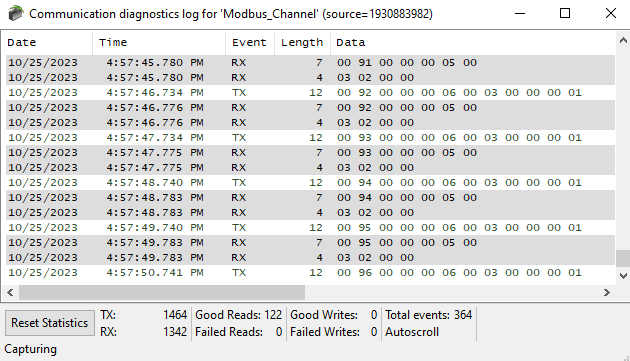
Your operations visibility relies on real-time data from machinery, systems, and field devices. When there are communications issues resulting in loss of or inaccurate data, addressing issues promptly is critical. Whether it's stale, poor quality, or missing data in your SCADA or HMI application, a well-defined troubleshooting procedure is a must. Like all our products, the TOP Server OPC Server offers an arsenal of tools to inform you about what is happening and streamline your troubleshooting process, summarized in our previous blog post, Minimize Downtime with TOP Server Troubleshooting Tools.
In this post, we'll take a deep dive into some of those tools, with an emphasis on the device connection side of TOP Server, teaching you a step-by-step process to pinpoint communication issues at their source. While this specific example uses the Modbus Ethernet Driver and an OPC DA Client connection, the same principles can be applied when troubleshooting various other scenarios.
